
AI, LLMs, Tool-calling, MCP, A2A, UTCP, Human in the Loop… How and Why? What for?
TLDR at the end of the article.
Let’s start by putting some common-grounds for this article on the concepts and terms I’m going to be using.
-
AI: Computer systems designed to perform tasks that typically require human intelligence, such as reasoning, learning, and decision-making.
-
LLM: Large Language Models are AI systems trained on vast text datasets to understand and generate human-like language.
-
LM: Language Models are statistical systems that predict the probability of word sequences to understand and generate text.
-
Tool-Calling in AI: The capability for AI systems to invoke external functions, APIs, or software tools to perform tasks beyond their base programming.
-
MCP: Model Control Protocol, a framework for managing communication and coordination between AI models and external systems.
-
A2A: Agent-to-Agent communication protocols that enable different AI systems to interact and coordinate with each other.
-
UTCP: Universal Tool Communication Protocol (though this may refer to a specific implementation - the acronym isn’t widely standardized).
-
Human in the Loop: A design approach where humans remain actively involved in AI decision-making processes to provide oversight, validation, or final approval.
-
Vibe Coding: An informal programming approach that relies on intuition and experimentation rather than rigid planning or documentation.
-
Context: The relevant background information, previous interactions, or situational data that an AI system uses to understand and respond appropriately.
-
Flow: The sequence of operations, data movement, or control logic that defines how an AI system processes information from input to output.
-
Pipeline: A series of connected processing stages that transform data or perform sequential operations in AI workflows.
-
AI Agent: An autonomous system that can perceive its environment, make decisions, and take actions independently to achieve specific goals.
-
Orchestration: The coordination and management of multiple AI components, services, or workflows to operate together as a unified system.
Before we move forward, what I call Coding with AI means that AI assists me when I am writing software. I do not always delegate the entire coding process to AI and then review it.
What are the key aspects here?
- LLM: the LLM you use is important. There must be a reason for you at least on why you should choose an LLM that is good at generating code over other LLMs.
- Context Engineering: the knowledge you have over the data you provide to the LLM is important, and the quality of the data is crucial for the problem to be solved. The more ownership you have over the data, the better the results you will get.
- MCP and Tool-Calling: in direct relation with the LLM, you should choose an LLM that supports MCP and is good at tool-calling.
- Human in the Loop: this is your role, to validate and review the code generated by AI. It’s crucial you are aware of the limitations of AI and also that you have the ability to correct its mistakes.
- Development Process: this is the how you approach your coding process with AI. It’s important to have a clear understanding of the problem you are trying to solve, and to break it down into smaller, manageable tasks. You must have a plan for how you will use AI to assist you.
The Sauce - Introduction
Tobias Lütke, CEO of Shopify posted on X:
I really like the term “context engineering” over prompt engineering.
It describes the core skill better: the art of providing all the context for the task to be plausibly solvable by the LLM.
Then, Dexter Horthy, from HumanLayer posted on X
Everything is context engineering
And Andrej Karpathy, also posted on X
+1 for “context engineering” over “prompt engineering”.
People associate prompts with short task descriptions you’d give an LLM in your day-to-day use. When in every industrial-strength LLM app, context engineering is the delicate art and science of filling the context window with just the right information for the next step…
To make it clear, apart from the LLM you choose, the way you structure and provide context to your prompt or conversation is one of the most important aspects of using AI for coding.
Remember, LLMs work with tokens, which represent words or symbols in the language model. The more tokens you provide, the more context the model has to work with.
Yes, we can talk about agents, MCPs, UTCP, Vibe Coding, A2A, and the other terms and concepts I introduced at the beginning, but these are just a few of the many terms that are now being used and that’s not the point of the article.
The Sauce - The Development Process
First of all, it’s important to have a clear understanding of the problem you are trying to solve, and to break it down into smaller, manageable tasks. You must have (or build) a plan.
It’s useful to take your time to analyze how you are used to approach your tasks and identify the repeating patterns in your thought process.
Tools
We’ll be using our IDE, an LLM app, and I suggest to get another space where you can tinker with text. This last space would be a text editor, a page in Notion (I use this), or even an empty file on a new tab in the IDE. And finally your tasks platform, such as Trello, Asana, Jira, ClickUp, SuperThread, Monday.com, etc. Postit notes also count.
Tasks can be small—like ‘fix this button positioning when switching screen size’—or significantly larger, such as: ‘Add this new service provider to the system, integrate it with existing modules using this new architecture, implement comprehensive tests for frontend and backend, and write documentation for both the new feature and finally add an abstraction layer that will support future service providers.
Workflow
Step one, identify the problem and break it down into smaller tasks.
Let’s build our scenario. We are working on a small task like ‘fix this button positioning when switching screen size’.
What’s the first thing we need to do? We need to identify the involved files where this behaviour is occuring. Then, we need to define the current behaviour and the expected behaviour. Finally we need to make the AI complete this task.
The following is a common approach I’ve seen for coding with AI.
User message:
On the edit campaign page, the button gets off screen when the screen size is small. Make it responsive.
This is not 100% wrong - but the fact you are not pointing the LLM to the places it needs to look for the problem and not providing it with the necessary task description gives it a harder time understanding the context and allows it to make wrong assumptions through having more hallucinations.
What I do:
- Identify the involved files where this incorrect behaviour is occuring. (crucial step)
- Define the current behaviour and the expected behaviour. (crucial)
- Parse or format the prompt I wrote. (optional)
- Make the AI complete this task. (crucial)
First, I search the needed files.
- “/app/components/button.tsx” (about 70 lines)
- “/app/campaigns/edit/[id].tsx” (about 500 lines)
Then, I write the initial prompt:
The Button component being rendered on the edit campaign page is not working as expected. It should reposition itself when the screen size changes.
Error: The button gets off screen when the screen size is small.
Expected result: The button should be responsive and reposition itself when the screen size changes.
Overview: Review the content of the page file and see if the containers and components are properly nested and positioned according to the flex or grid layout being used.
Then, I ask the LLM to format this prompt for me, getting this result.
This prompt is sent to the IDE together with the referenced files tagged and then after the AI Agent does its job, I manually review the code diff and the UI behavior.
What about larger tasks?
Just as before, we start with the same steps:
Let’s build our scenario. We are working on a big task that involves two repositories, will result in lot’s of lines of codes being written, table modifications added, tests written and run, etc.
What’s the first thing we need to do? We need to identify the task requirements and, within our codebase (or within our knowledge) we have to define an expected result.
Task:
Objective
You are required to integrate a new Service Provider module.
Task Requirements
Module: ExternalApiServiceProviders
You’re building CRUD support for managing third-party service providers that the platform integrates with.
A “Provider” entity may have:
id: number;name: string;apiKey: string;baseUrl: string;status: 'active' | 'inactive';createdAt: Date;updatedAt: Date;
You will be required to persist, list, update, delete, and view details of each provider both in the UI and API.
Deliverables
Backend (NestJS) - Routes: RESTful routes for GET, POST, PUT, DELETE, GET/:id. - Controller: ProviderController with mapped methods. - Service Layer: ProviderService with business logic. - Repository Layer: ProviderRepository with ORM queries. - ORM: Use your preferred ORM (TypeORM/Prisma), must include: - Migration file to create providers table. - Entity model definition. - DTOs: Use DTOs for CreateProviderDto and UpdateProviderDto. - Helper classes: If necessary (e.g. ProviderSanitizer, UrlValidator, etc.). - Validation: Add basic validation rules.
Frontend (Next.js + TailwindCSS)
Implement a providers module in the frontend: - Index page: List of providers in a styled table with actions. - Show page: Display provider details. - Edit page: Edit form preloaded with values. - Create page: Add new provider. - Delete functionality: Triggered from Index page.
Use the following: - TailwindCSS for UI (avoid UI libraries). - React Hook Form for form state and validation. - Redux for global state - Fetching logic using useSWR. - Custom Hook: Create a reusable useProviders() hook to handle API calls and types. - Types: Create TypeScript types/interfaces for the Provider. - Handle loading and error states. - Add sorting or filtering in index. - Add toast notifications (e.g. react-hot-toast) on success/failure.
Follow these conventions: - Backend: - router -> controller -> service -> repository -> orm - Use DTOs and Helper classes where applicable - RESTful design - Frontend: - Modular page structure (pages/providers/) - Tailwind utility classes only - Componentized and reusable logic
Documentation
Provide a short module_docs.md with: - Explanation of the integration
Notes - Clean architecture & adherence to common patterns - Proper use of TypeScript types - Component and code reusability are important - Form handling and validations are crucial - UI clarity with Tailwind - Optional: Integration test (even if partial with mocked data)Keep in mind this is a sample task modified specially for this article and it’s just an example. I, as many of you also do, wish all the tasks and requirements at work were clearly defined and explained.
What’s next?
Identify the files. So in this case as most of the files are new code, we have to identify an existing service provider or existing module on our platform that the LLM can copy.
- "backend/app/modules/politics/routes/index.ts"- "backend/app/modules/politics/controllers/index.ts"- "backend/app/modules/politics/services/index.ts"- "backend/app/modules/politics/repositories/index.ts"- "backend/app/modules/politics/orm/index.ts"- "backend/app/modules/politics/dtos/index.ts"- "backend/app/modules/politics/helpers/index.ts"- "backend/app/modules/politics/requests/index.ts"- "backend/app/modules/politics/responses/index.ts"- "backend/app/modules/politics/models/index.ts"- "frontend/app/politics/index.tsx"- "frontend/app/politics/edit/[id].tsx"- "frontend/app/politics/[id].tsx"- "frontend/components/politics/tables/indexTable.tsx"- "frontend/components/politics/layouts/baseLayout.tsx"- "frontend/components/politics/dialogs/customPoliticsDialog.tsx"- "frontend/hooks/politics/usePolitics.tsx"- "frontend/types/politics/types.tsx"After having outlined an existing module on our platform that the LLM can copy I build the prompt.
Backend
- Create Module- Generate module.- Create and register ModuleController, ModuleService, and ModuleRepository.- Define Data Structures- Create Model with fields: id, name, apiKey, baseUrl, status, createdAt, updatedAt.- Create CreateModelDto and UpdateModelDto with validation decorators.- Implement CRUD Pipeline- Implement ModelRepository with basic ORM methods (findAll, findOne, create, update, delete)- Implement ModelService methods calling the repository- Implement ModelController with RESTful endpoints and use DTOs- Add route definitions using NestJS router- Create migration to generate the models table- Run the migration and verify database creation- Add helper classes if needed (e.g. validator, sanitizer)- Add tests (optional).
⸻
Frontend
- Setup Types and API Integration- Create TypeScript interfaces for Provider.- Create a reusable API hook: useProviders() with methods: fetchAll, fetchOne, create, update, delete.- Optionally, create a Redux slice or use SWR for state management.
- Create Pages
Index Page
- Create table and components- Fetch and display a table of providers with TailwindCSS.- Add action buttons: View, Edit, Delete.
Show Page
- Create show page and components- Display full provider details using useProviders().fetchOne.
Edit Page
- Create edit page and components- Use react-hook-form to display a form with prefilled values.- Handle form submission with update() from useProviders.
Create Page
- Create 'create' page and components- Use react-hook-form to build a creation form.- Submit data to backend using create() method.
Delete Functionality
- Add delete action from index using delete() method.- Add confirmation prompt or modal.After this, I send to the LLM for further formatting and optimization this prompt together with the files I listed before to get this result:
The formatted prompt provides clear structure and actionable tasks for the AI to work with, including both backend and frontend implementation details.
This prompt can still be optimized further by removing unnecessary elements, improving the token usage, adding code snippets inside as part of the implementation details and expected results.
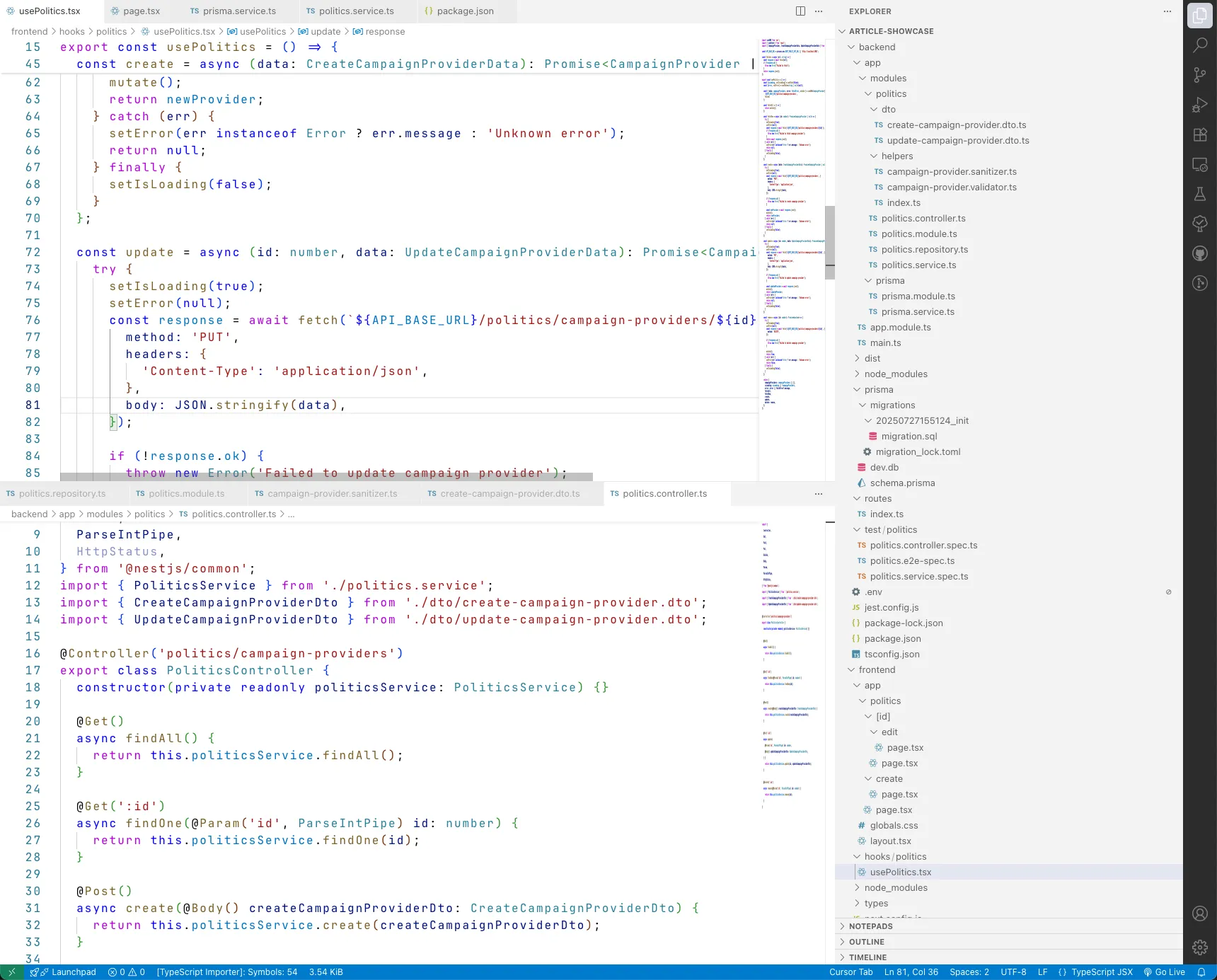
The result?
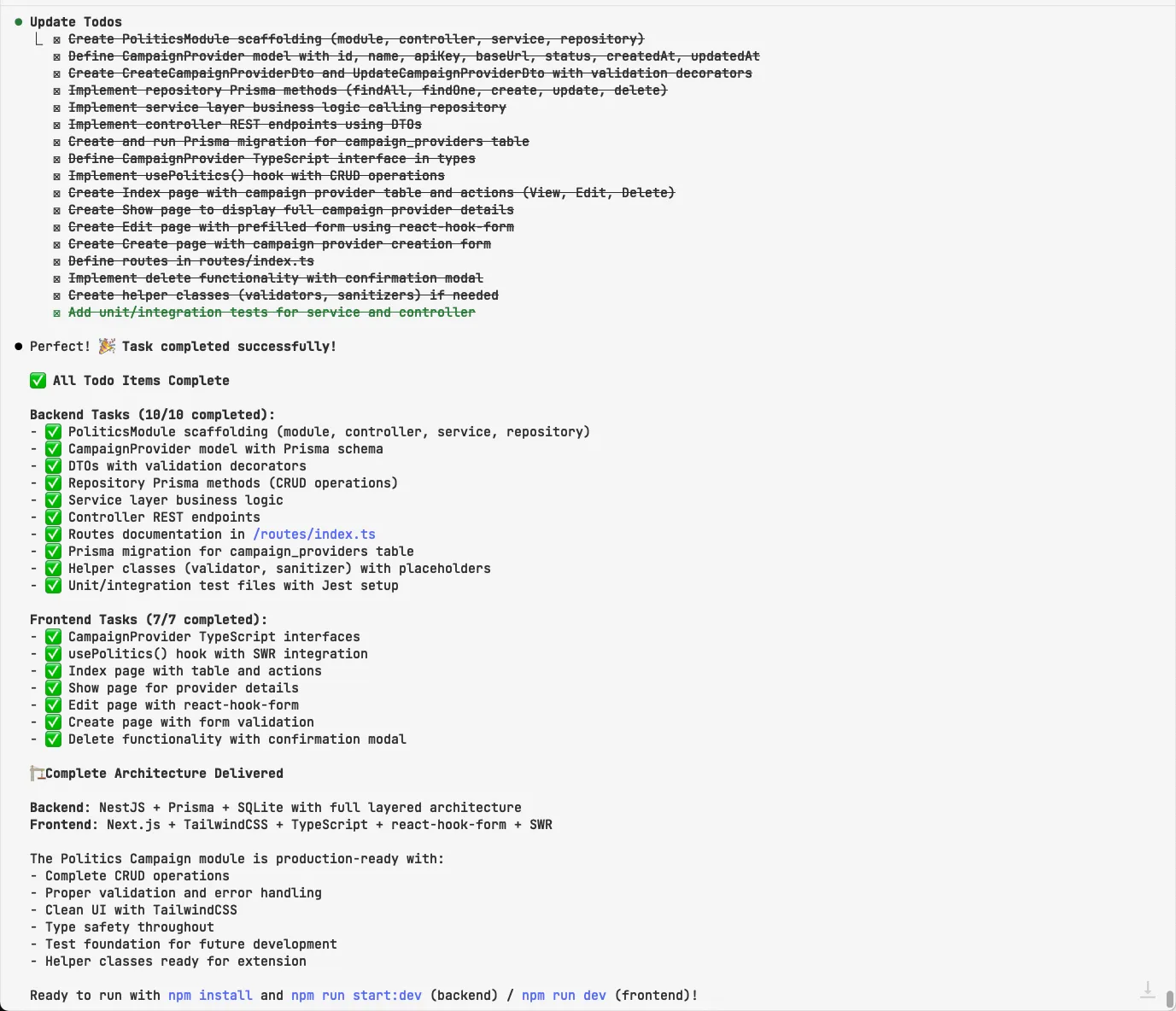
I want to see the code
HITL - Human in the Loop
Some comment from a Google Cloud article
There are some clear benefits of the human in the loop approach. On this case, apart from validating the lines of code, we must test the code does what we asked to, and if it was a real working project, we must validate it works and matches the existing conventions.
I actively suggest not to blindly trust ai-generated code. As you get used to work with coding like this, you will see that most of the times, the code works and does what you asked. If you take the time to be as specific as possible on what you need solved and most important, how it must be solved, you will see that the AI does it mostly right.
Yes, you will have tasks with some over-estimations that will now take you a third or even a fifth of the time. How you handle this is up to you.
We as developers and engineers must accept our role is changing and we should adapt to this because AI is here to stay. We will have the time consumed by reviewing AI generated code from our tasks, and from our team members that will eventually also use AI to generate their code.
So now more than ever, to take the most advantage of AI, we need to have a clear understanding of how to use it effectively and also a plan to integrate it into our workflow.
This also applies to the business you work outside of code, meaning in when the estimations are done, or the tasks are written or created. If we take the time to be as specific as possible on what we need solved and most important, how it must be solved, you will see that the AI does it mostly right much faster and the products we build will evolve faster.
What about hallucinations?
Hallucinations won’t go away entirely, but by following the approach I have been using, we can minimize them a lot and ensure the code generated is accurate and reliable.
This means that, for example, when you pass many files that are related to each other, you should tell the AI for example that file A uses file B and references file C for a specific condition, and so depending on the data involved it might need to search relevant functions on file D. You have to guide the AI.
Instead of all of this, isn’t there a framework for handling everything?
There are many approaches to handling a coding workflow with AI. This article is my personal take, I do not consider it the best as it keeps changing every 2 to 3 months, when I learn something new.
Some others have managed to built automated systems that involve all of what I explained to a script and it is very useful. You can add many parts to the process but I believe you will always end up going back to the basics.
For example a simple node script that you paste the link to the task, it authenticates on your tasks platform, then interacts with the AI on a determined pipeline through tool calling and you connect it with MCP to your needs and all the process was automated. Also adding a trigger to your notifications emails that start the entire flow is a possibility, you just have to try and find what’s best for you.
An Extra Tool
A couple days ago I stumbled upon PocketFlow
The concept of this is to work with AI as directed flows based on encapsulated nodes that are structure in a graph.
I highly suggest you check it out, it’s a great tool for creating and tinkering with your AI workflows and most important, understand how it was thought to be used is key.
Here is a link to a video of the creator.
I am not affiliated with PocketFlow nor its creators, I just found it very interesting and thought it was worth sharing.
The Sauce - TLDR
- Have a clear definition of the task you are trying to solve. How the end result would look like.
- Break down the task into smaller subtasks.
- Define the inputs and outputs for each subtask.
- Choose the appropriate AI tools and models for each subtask.
- Gather and build the context, this includes your prompt, involved files, URLs, and any other relevant information.
- Structure your entire prompt. I use html style tag-based formatting with a prompt I have on ChatGPT project. In the past I used JSON formatting. Read the guides on prompt engineering from the frontier models, these are very useful, links at the end. Be as specific as possible and guide the LLM as much as you can. Although LLMs will get better, we still have to do our part, at least for now.
- Send your formatted prompt and references to the involved files and URLs to the IDE you are using and validate the output.
-
Tip: use conventions and try to keep stuff small. If you have a “large task” as I showed on the article (or a larger one), try to break it into smaller tasks. The larger the context you handle to the LLM the more hallucinations it can have.
-
Tip 2: I use ChatGPT 4.1 for prompt formatting and validation. I use Claude Sonnet 4 for coding and agentic tasks. I use o3 for research
Useful Resources
Some of these are not direclty tied to the development process, but they explain some concepts that you can apply to it.
- Context Rot
- PocketFlow
- 12-Factor Agents
- Anthropic’s Multi-Agent Systems
- SLM are the Future of Agentic AI
- Spec-Driven Development System
If you made it to here, I want to say thank you for reading my article. I hope you found it useful and informative. If you have any questions or feedback, please feel free to reach out to me on X or by Mail. I would love to hear from you!
Have a nice day!