Previously, on Vibe Coding & Spec-driven development…
This article is a continuation of my previous article about AI for coding. If you haven’t read it, I highly recommend doing so.
TL;DR
- Context Engineering: Build structured documentation (business rules, architecture, task plans) that AI agents can traverse to understand your project
- Tool Selection: Use Cursor for active coding, Claude Code for complex tasks, Codex for planning and research
- Task Atomization: Break complex tasks into small, testable units that agents can execute independently
Day by day, things move faster—and AI has moved even faster. 2025 was the year of agents.
In July, in my previous article about AI for coding, I wrote about a set of concepts and shifts that were occurring in the software industry. Some of those were MCP, human in the loop, vibe coding, and specs.
One of the controversial things at the moment was “vibe coding,” which had many interpretations and definitions. Today, given how things have evolved—and the set of tools that have gained a place in the workflows of thousands of developers—the concept has, for some, evolved into Vibe Engineering.
Who knows what’s coming next.
Today, instead of giving a set of definitions, I want to share, based on what I’ve learned over the last year, some tips on architectural decisions and workflows for your projects, and things you should consider and which tools or elements of the AI-assisted coding approach you should consider and why.
Before we start, I suggest you download the images of the diagrams to have a better view of them instead of using the preview provided by my website.
So, what do we do now? Here is the plan.
Context Engineering
This, to me, is the most important aspect to keep in mind. I recently gave a talk at a Cursor Meetup in Tandil. During the Q&A at the end, I noticed a pattern: the main concern around effective AI agent usage was directly tied to context management and how to improve results.
First, as I stated in my previous article and explained in the meetup, you must invest time in creating the information that agent tools will use. You need to write documentation designed specifically for agents, tailored and curated for how they use their tools. This is crucial for improving the results you’ll get.
Here is the first tip:
Mandatory: Read the docs provided by the company providing the agent tool. Nowadays most of them have a section for context engineering and techniques for better tool use, and better prompting. This is specifically designed to improve your capabilities on the tools they provide (Claude Code, Codex, Cursor, OpenCode, etc.). Doing this is a must.
After processing millions of tokens, I discovered this workflow produces the best results. It’s quite simple and effective.
First you have to define the following:
- Business rules (BUSINESS_RULES.MD)
- Architectural aspects (ARCHITECTURE.MD)
- Required and relevant files (TASK_ID_FILES.MD)
- If available, already-made implementations of the solution, to be referenced as a logical source of truth (TASK_ID_REFERENCE_OUTPUTS.MD)
- The problem, transformed through your thought, to the plan to achieve the expected result (TASK_ID_PLAN.MD).
This is the chain of thought you would normally follow to develop a solution—now documented for the AI. Think of it as your mental plan for tackling tickets, bugs, or features, but written down.
So now you have the necessary elements clearly defined and tailored for the agent. This should be done project-wide for better results. I highly encourage you to build and update docs including file/method references, data flow and pipelines, commands, external service integrations, business rules with references/tags, and connections between repositories if needed. This way you are setting clear grounds for the agent to go in the correct direction when given a task.
A strategy like this can be seen in the following diagram (I suggest opening it in a new tab for a better view):

This is my general strategy for project-wide context tailoring for the agents to become more effective. Useful on small and large projects alike.
This structure dramatically improves agentic coding tool effectiveness by creating a hierarchical knowledge graph that mirrors how engineering teams actually work.
When an AI agent needs to implement a feature or fix a bug, it can traverse from the wrapper’s BUSINESS_RULES.md and ARCHITECTURE.md to understand project-wide constraints and patterns. Then it can drill down into repository-specific docs to grasp local context (files, flows, pipelines), and finally navigate cross-references to understand dependencies between services.
This prevents the agent from making architecturally inconsistent changes or violating business rules, as it has explicit pointers to the “why” behind decisions rather than just inferring from code.
For developers, this means AI assistants can autonomously generate specs, suggest refactors, or implement features with much higher accuracy because they’re working from the same single source of truth that human engineers would consult. Essentially, you’re giving the agent a mental model of the system that persists across conversations and reduces hallucinations about project structure, conventions, and requirements.
Agentic Tools For Coding
Full disclosure, I am not affiliated with any of the companies or products I mention here. I just used these and found them to be very useful. If someone wants to sponsor me with credits for their stuff, please reach out to me. Also the stuff I did not mention here are not bad, but I just did not use them or I did not find them to be as useful as the ones I mentioned.
- Cursor Agents and Cursor Tabs
- Anthropic’s Claude Code
- OpenAI’s Codex
Each tool has its own strengths and weaknesses, as LLMs also do.
After trying all of them, my conclusions are:
-
Claude Code (Anthropic’s CLI-based AI coding agent) with Sonnet and Opus is exceptional—it doesn’t get any better than this. For large and complex tasks, I strongly recommend taking your time to tailor the context and write the prompt carefully with as many specs and as much documentation as possible, then use Opus. Also, the more you use the tool, the better the results will be. There will be a point where you switch to Sonnet, and since it’s cheaper, it might end up becoming your daily driver in Claude Code.
-
Cursor (AI-first code editor), I see it as the best AI coding suite. I used VS Code, tried Windsurf, Antigravity, and Zed, but with Cursor everything felt right. As I have been using Cursor for a while now—since they first launched Composer as a feature a couple years back—I consider Cursor Agents and Cursor Tab the most useful pair of tools for active coding, with a strong focus on you being part of the process. Cursor Tab, to me, has no competition. They have agents, planning mode, debugging, bug hunter, background agents, a large list of models to choose from, and recently they acquired Graphite, a code review platform.
-
My thoughts on Codex (OpenAI’s code assistant) are that it’s not as good as the other two for coding tasks. I found it having more problems with hallucinations than the other two when using it for coding. It easily entered tool-calling loops and the entire context became corrupted. However, it has its place: following the context engineering approach I mentioned earlier, I use it for project planning, prompt composition, PRD generation, performance research, context validation, and more.
To close this section, here is the second tip:
- Use Cursor as your main AI coding suite. You’ll become addicted to its Tab model—it’s that good. Inside Cursor, make use of the agents, debugging, and the rest of their features. Test their own models and come up with your own conclusions about what’s best for you.
- If you’re more of a CLI person, use Claude Code in the terminal. Otherwise, install the Claude Code extension in Cursor and combine the best of both worlds. It’s easier inside the editor to reference files when building context, but I personally prefer referencing things in .md files.
- Inside your repository, have a directory for planning and context engineering, which should be frequently updated as tasks are completed. I use this directory mostly with Codex and Cursor’s or Claude’s “ask mode” to help build the context into a markdown file.
- Automate the process of building and tailoring context for your agent tool, through a script or an AI workflow. This will save you a lot of time and effort. It takes time at the beginning, but it pays off in the long run.
- Use the features that agent tools provide to your advantage. Use MCPs. Claude has commands, skills, subagents, and other features to help you with context engineering and tool use. Cursor has rules and the ability to create your own modes. Codex also has its features like Slack integration, its SDK, cloud, and more.
Both Claude Code and Codex have their extensions in Cursor and Vscode.
Atomization for agents
One of the patterns I learned early in UX/UI design is Atomic Design. Its equivalent in software engineering is atomization.
Atomic Design Principles are a set of design principles that help you create a consistent and reusable design system. They are:
- Atoms
- Molecules
- Organisms
- Templates
- Pages
In software engineering, atomization is the process of breaking down a complex system into smaller, more manageable parts. This improves the readability and maintainability of code. It is related to the SOLID principles and DRY principles.
When working with AI agents, this approach is particularly useful because agents perform better with smaller, well-defined tasks than with large, ambiguous ones.
Here is an example with a before and after for a given task:
After atomizing the task, you can implement the context engineering flow previously described to build the context for the agents to use. You then assign each task to a different agent. With the use of parallel processing, subagents, or a queue, you can have a set of tasks that can be assigned to different agents and you can have a relatively quick completion of the entire task, thanks to it’s decomposition/atomization.
To close this section, here is the third tip:
- Atomize the task into smaller, more manageable parts. You can use the task breakdown example above as a reference.
- Implement the context engineering flow in an atomized way, to build the context for the agent to use, for each task.
- Assign each task to a different agent or build a queue with a workflow that upon finishing a task, clears and updates the context and docs for the next task.
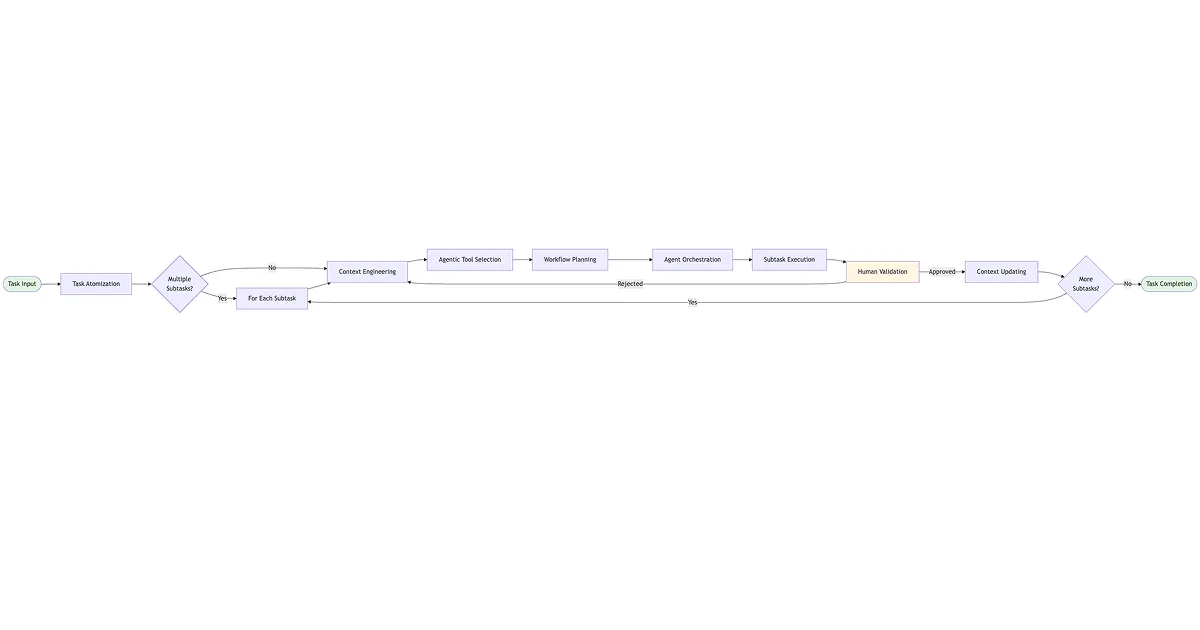
Here is an example of a task breakdown and the context engineering flow, using task breakdown, context engineering, queue-processing, human in the loop, validation and agent orchestration. I suggest you to take your time to connect each of the diagrams and understand the flow.
Task Decomposition for Agents (general overview)

Agent Orchestration for each phase of the task

Agent Execution for each part of the task phase, queue-processing and context handling

Context Packaging for the agent execution

This is a general flow that can be adapted to your specific needs and project.
Frequently Asked Questions
What is Vibe Engineering?
Vibe Engineering is an evolution of “vibe coding” that emphasizes structured workflows, context engineering, and task atomization when working with AI coding agents. It transforms the casual “just let the AI figure it out” approach into a methodical system for better results.
What’s the difference between vibe coding and vibe engineering?
Vibe coding often implies casual, unstructured AI-assisted coding where you rely heavily on the AI’s interpretation. Vibe engineering adds methodology: structured context documentation, decomposed tasks, and systematic agent orchestration to achieve more consistent and accurate results.
Which AI coding tool should I use?
It depends on your task:
- For active coding: Cursor (Tab + Agents)—best for real-time coding assistance
- For complex implementations: Claude Code with Opus—best for large, well-documented tasks
- For planning and research: Codex—useful for PRDs, context validation, and project planning
What is context engineering for AI agents?
Context engineering is the practice of creating structured documentation and knowledge hierarchies that AI agents can traverse to understand your project’s business rules, architecture, and task requirements. It includes creating files like BUSINESS_RULES.md, ARCHITECTURE.md, and task-specific documentation.
How do I get better results from AI coding tools?
- Read the official documentation for your tools
- Build project-wide context documentation
- Atomize complex tasks into smaller, testable units
- Use the right tool for each type of task
- Iterate and refine your prompts based on results
Final Thoughts and Conclusion
- Take the time to build the context for the agents.
- Take the time to decompose tasks into smaller, more manageable tasks.
- Use agents to your advantage to help with task decomposition and context engineering.
- Create tools for repetitive tasks and workflows. Create automations, commands, skills, etc. for the agents to use.
- Tailor docs for the agents to use.
- Use the features that agent tools provide. Read the docs from the companies providing the tools—they’re there for a reason.
- Study and understand wider concepts of how AI works and how to apply them to your projects and workflows.
I hope you found this article useful. If you have any questions or feedback, feel free to reach out to me on X or by email. I’d love to hear from you!
Have a nice day!